Customer onboarding automation uses event-driven workflows, integrations and decisioning to get new customers to first value faster and reduce early churn. Instead of a person manually sending the welcome email, checking who logged in, and chasing stragglers, the system does it based on what each customer actually does. The result: faster activation, fewer support tickets, and a consistent experience whether you onboard ten customers a month or ten thousand. AI personalisation and multi-channel orchestration are increasingly what separate a basic drip sequence from a system that actually adapts.
TL;DR:
- Automated onboarding workflows activate customers instantly and respond to their behavior in real time, reducing delays and manual errors.
- Automation improves conversion and retention by guiding customers to activation milestones faster, which increases lifetime value and reduces churn.
- Critical components include trigger engines, multi-channel messaging, integrations, compliance tools, and AI-driven decisioning for personalisation.
- Implementing automation effectively requires mapping milestones, prioritizing high-impact tasks, testing with controlled cohorts, and regularly auditing triggers.
- The typical deployment cycle lasts around 90 days, focusing on assessment, build, pilot, and scaling, ensuring measurable improvements in activation rates.
Table of Contents
- What is customer onboarding automation, really?
- What are the key benefits of automating onboarding?
- What are the core components of onboarding automation?
- How do you implement onboarding workflow automation step by step?
- How do you measure onboarding automation with the right KPIs?
- What goes wrong with onboarding automation, and how do you keep it healthy?
- What does Throughline Automation's 90-day path to production look like?
- Why activation milestones should drive your automation roadmap
- Get a clear plan for automating your onboarding
- Sources
What is customer onboarding automation, really?
Most teams already have an onboarding process. It's just running on someone's memory, a spreadsheet, and whatever they remember to do before their coffee goes cold. Customer onboarding automation replaces that manual sequence with software that reacts to customer behaviour in real time, following rules you set once and refine as you learn.
Take a typical SaaS signup. In a manual process, someone on the customer success team sends a welcome email, maybe checks in on day three, and follows up if the customer hasn't logged in by day seven, assuming they remember to check. In an automated onboarding process, the welcome email fires the second the account is created. If the customer hasn't completed a key setup step within 48 hours, a behavioural trigger sends a targeted nudge, maybe an in-app tooltip pointing to the exact feature they skipped. Braze describes this as event-driven journeys, where behavioural triggers and multi-channel orchestration replace static, one-size-fits-all sequences.
The difference shows up in three places:
- Scale: automated workflows treat customer 1 and customer 10,000 identically, with zero degradation in speed or quality.
- Speed: triggers fire in seconds or minutes, not whenever a human next checks their task list.
- Error reduction: no forgotten follow-ups, no copy-paste mistakes, no customers who fall through the cracks because the account manager was on leave.
Onboarding automation isn't a bolt-on feature, either. It sits across the whole early customer lifecycle, from signup through activation and into the first weeks of genuine use, which is exactly the window where most churn decisions get made. Mailchimp's research on automated onboarding points to this same pattern: automation reduces the bottlenecks that slow the transition from prospect to genuinely engaged, paying customer.
What are the key benefits of automating onboarding?
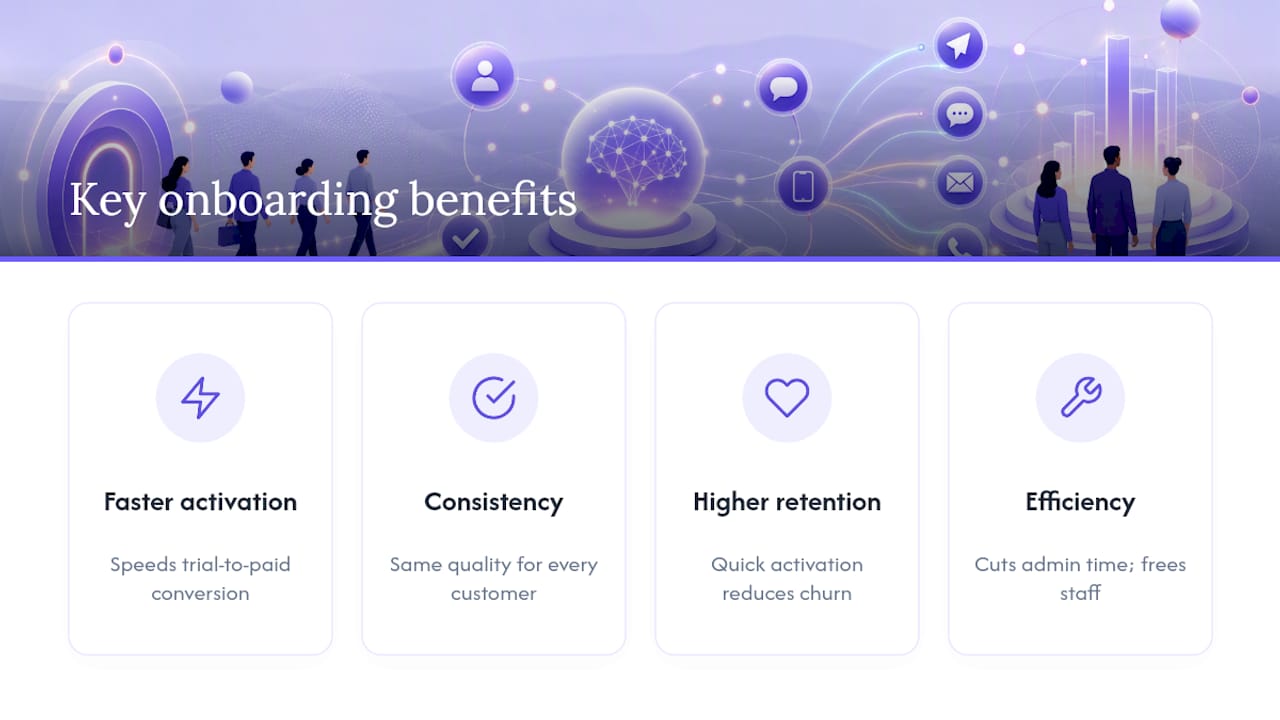
The case for automating onboarding isn't theoretical. It shows up in four measurable places, and each one has a direct line back to revenue.
Faster activation and better conversion. When a customer hits their "aha moment" sooner, whether that's completing setup, inviting a teammate, or running their first report, they're more likely to convert from trial to paid, and more likely to stick around afterwards. Automated nudges that respond to actual behaviour close that gap faster than a generic email drip ever could.
Consistency at scale. Every customer gets the same quality of onboarding regardless of who's rostered on that week, or whether your team just grew by 30% after a big sales quarter.
Higher retention and lifetime value. Customers who reach activation quickly churn less in the following months. Automation removes the delays and dropped follow-ups that quietly erode early trust.
Operational efficiency. This is where the cost savings show up. SHRM's research on automation in HR functions found that automating repetitive administrative tasks meaningfully cuts the cost of running benefits and onboarding programs, freeing staff for higher-value work like relationship-building and problem-solving.
Statistic worth sitting with: vendor case material collected by iCIMS on automated onboarding documents examples of onboarding-related administrative time cut dramatically once account provisioning and scheduling tasks move to automated workflows. That's not a universal guarantee, but it shows the ceiling on what's achievable when the manual steps are genuinely repetitive.
What are the core components of onboarding automation?
Underneath any onboarding automation system, five layers do the actual work. Skip one, and the whole thing feels clunky no matter how much you spend on the rest.
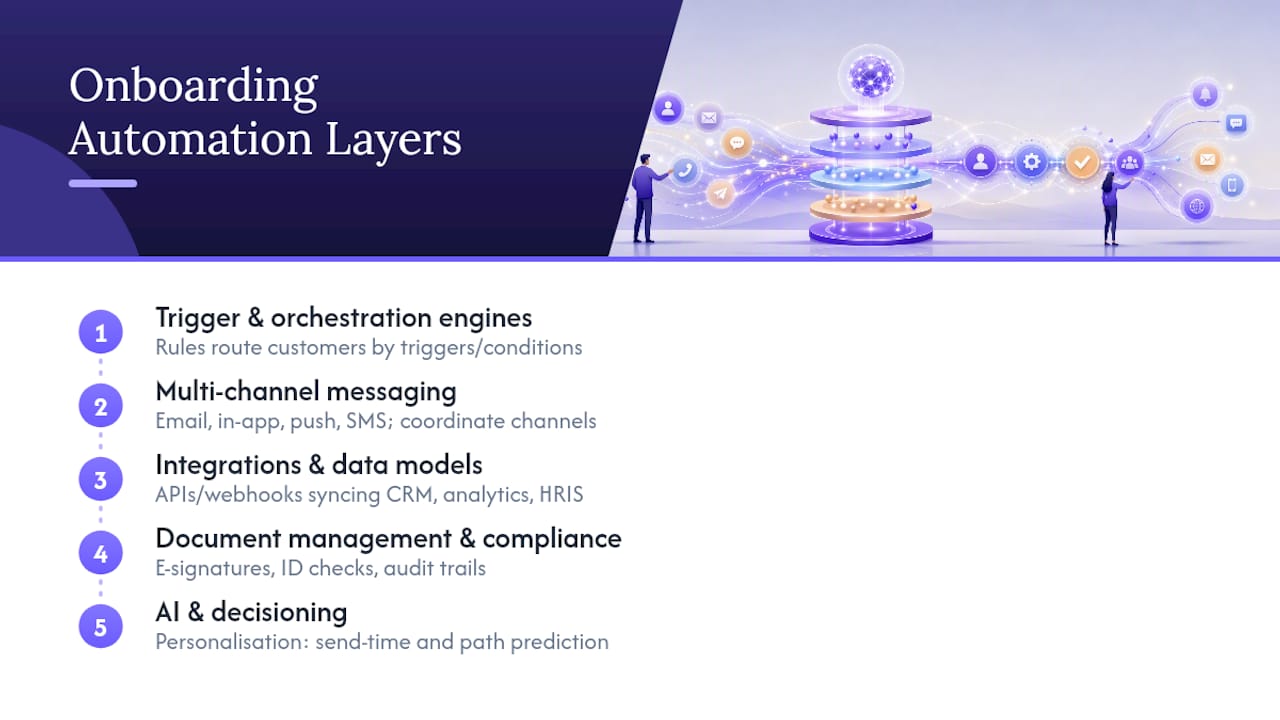
Trigger and orchestration engines. This is the brain: rules that decide what happens when. A customer signs up (trigger), and depending on their plan tier, industry, or the features they touched first (conditional logic), they get routed into a different path. Good orchestration engines let you branch based on dozens of variables without turning your workflow into an unreadable mess.
Multi-channel messaging. Email is still the workhorse, but it's rarely enough on its own. In-app messages catch customers while they're already in the product, doing the task you want to nudge them on. Push notifications and SMS bring people back when they've drifted away entirely. The coordination matters more than any single channel: a customer shouldn't get an SMS reminder about a step they finished ten minutes ago in-app.
Integrations and data models. Onboarding automation is only as good as the data feeding it. That means APIs and webhooks connecting your CRM, your product analytics, and often an HRIS or LMS if onboarding touches internal teams too. Without clean integrations, triggers fire on stale or wrong data, and customers get messages that make no sense.
Document management and compliance tooling. For regulated sectors, onboarding isn't just welcome emails. It's e-signatures, identity verification, and audit trails. One Constellation's work on regulated onboarding describes how financial services firms stack KYC, KYB and AML screening directly into the onboarding workflow, so compliance happens automatically rather than as a separate manual gate.
AI and decisioning. This is the layer doing the heavy lifting on personalisation. Gartner has flagged AI decisioning and automation as one of the highest-value AI applications in customer service and support, and onboarding is where it shows up first: predicting the best send time for a nudge, or picking which of three onboarding paths suits this particular customer's usage pattern. Throughline Automation's AI automation work focuses on exactly this kind of decision layer, built around whatever tools a business already runs.
How do you implement onboarding workflow automation step by step?
Building an automated onboarding process from scratch feels overwhelming until you break it into a sequence. Here's the order that actually works, based on how implementation teams tend to succeed rather than stall.
- Map activation milestones by persona and tier. Before automating anything, define what "activated" actually means for different customer segments. An enterprise buyer's first value moment looks nothing like a self-serve trial user's.
- Prioritise by impact times effort. List every manual onboarding task you currently do, then rank by how much time it eats versus how hard it is to automate. Start with the high-impact, low-effort wins, not the flashiest idea.
- Design templated success plans. Build out the ideal journey for each segment before you automate a single step. Automating a messy process just makes the mess move faster.
- Define triggers, conditional paths and channel sequencing. Decide exactly what event fires what message, on what channel, and what happens if the customer doesn't respond.
- Integrate systems and prepare data schemas. Connect your CRM, product analytics and support tools, and plan for what happens when data is missing or malformed, because it will be, eventually.
- Build templates. Write the actual message copy, in-app prompts, documents and task lists you'll need for each path.
- Pilot with a controlled cohort. Run the new workflow with a defined group, not your entire customer base, and measure activation rate against your baseline before rolling further.
- Set governance. Assign an owner for the whole workflow, define an escalation path for customers who fall through automated gaps, and schedule a regular review cadence, monthly at minimum in the first year.
Practical implementation guidance from iCIMS backs the pilot-first approach specifically: starting with a defined cohort and measuring activation-rate improvement is the clearest signal that a workflow is ready to scale, rather than guessing based on gut feel.
Pro Tip: Run your pilot cohort for at least one full billing cycle before declaring success. A workflow that looks great in week one can quietly leak customers by week six if your "day 30" check-in trigger was never actually tested.
How do you measure onboarding automation with the right KPIs?
You can't improve what you don't measure, and onboarding is one of the easiest parts of the customer lifecycle to measure precisely, because almost every step generates an event you can log.
Activation rate is the core number: the percentage of new customers who complete your defined activation milestone within a set window. If 400 of 1,000 new signups complete onboarding within 14 days, your activation rate is 40%. Track it weekly, not just monthly, so you catch problems before they compound.
Time to first value measures the median time between signup and that first activation milestone. Shrinking this number is usually the single biggest lever on retention.
Task completion rate breaks activation down by step, showing you exactly where customers stall.
| Metric | What it measures | How to calculate |
|---|---|---|
| Activation rate | % completing key milestone | Activated customers ÷ total signups |
| Time to first value | Median days to milestone | Median (activation date − signup date) |
| Task completion rate | % completing each onboarding step | Step completions ÷ customers reaching that step |
| Day 7/14/30 retention | % still active at each interval | Active customers at day N ÷ total cohort |
| Trial to paid conversion | % converting after trial | Paid conversions ÷ total trials started |
Cohort retention at day 7, 14 and 30 tells you whether early activation actually sticks, and trial-to-paid conversion ties the whole exercise back to revenue. On the operational side, track manual touches removed and cost per onboarded customer, the numbers that justify the investment to finance.
Run A/B tests on send timing, message copy and channel choice inside your existing workflows rather than treating measurement as a one-off audit.
What goes wrong with onboarding automation, and how do you keep it healthy?
The single biggest mistake teams make is automating a broken process. If your manual onboarding is confusing or inconsistent today, automation just makes the confusion faster and more consistent. Practitioner guidance on customer onboarding is blunt about this: design a clean, templated success plan first, then layer automation on top of it, never the other way round.
The next failure mode is data quality. Automated triggers firing on stale CRM fields or duplicate records send customers contradictory messages, which erodes trust faster than a slow manual process ever would.
Common pitfalls worth watching for:
- Automating a process nobody has actually mapped out end to end.
- Letting integrations silently fail, so triggers stop firing and nobody notices for weeks.
- Over-automating high-value accounts that genuinely need a human check-in.
- Skipping periodic review, so workflows built for last year's product still run unchanged today.
Keep a human in the loop for your highest-value or highest-risk accounts. Automation should handle the repetitive 80%, freeing your team to spend real attention on the 20% that needs judgement. And if your onboarding touches personal or financial data, build your privacy and compliance checks into the workflow design itself rather than treating them as an afterthought.
Pro Tip: Set a recurring calendar reminder, quarterly at minimum, to audit your onboarding triggers against current product features. Workflows quietly go stale the moment you ship a new feature nobody wired into the automation.
What does Throughline Automation's 90-day path to production look like?
Most businesses don't need a six-month software overhaul to get onboarding automation working. They need someone to map the actual process, wire it into the tools they already run, and prove it works before scaling further.
Throughline Automation's 90-day transformation is structured around exactly that sequence: assessment and journey mapping in the opening weeks, build and integration through the middle stretch, then pilot and rollout by the end of the third month.
Typical onboarding tasks that get automated in this kind of engagement include:
- Welcome sequences triggered instantly on signup or contract signature.
- Document collection and e-signature routing for new accounts.
- CRM and support-ticket updates that used to require manual data entry.
- Task assignment and internal notifications when a new customer needs setup work.
- Behavioural nudges triggered by product usage rather than a fixed calendar.
The starting point is the Free Business Automation Assessment, which maps your current onboarding process, flags the highest-impact automation opportunities, and shows roughly what deploying them would look like against your existing software stack, no rip-and-replace required.
Whether to build this internally, hire a specialist, or partner with a firm like Throughline Automation usually comes down to one question: does your team have the integration and workflow-design capacity to spare right now, or would three months of focused external effort get you there faster?
Why activation milestones should drive your automation roadmap
The mistake we see most often isn't technical, it's sequencing. Businesses automate the easiest tasks first, welcome emails, calendar invites, instead of the tasks that actually move customers toward activation. Easy isn't the same as valuable.
Start with whatever manual step currently causes the most customers to stall, even if it's harder to build. That's where automation pays for itself fastest, because you're removing the actual bottleneck, not just tidying the edges around it.
The ROI case is straightforward: a high-impact automation that touches every new customer beats five low-impact automations that touch a fraction of them. If you're not sure which bottleneck matters most in your own funnel, that's precisely what a proper assessment should tell you before you build anything.
— Throughline
Get a clear plan for automating your onboarding
Plenty of businesses cobble together onboarding automation from a CRM's built-in email sequences and a few Zapier connections. That works, until you hit a stalled integration, a persona-specific edge case, or a compliance requirement that generic tools weren't built to handle. Throughline Automation exists for exactly that gap: instead of stitching together templates yourself, you get a system built around the software you already run, designed by people who map your actual process before writing a single workflow rule.
The starting point is the Free Business Automation Assessment, which walks through your current onboarding process and flags exactly where automation would save the most time and reduce the most drop-off, no commitment attached. From there, the 90-day transformation takes you from assessment to a live, integrated onboarding workflow without touching your existing tech stack. If you're ready to see what that looks like for your business, book your assessment and get a clear picture of what's possible before you decide anything.
Sources
For readers who want to go deeper on specific parts of this topic, these sources informed the claims made throughout this article:
- Gartner press release — valuable AI use cases for customer service and support
- SHRM — Automation can help reduce cost of benefits
- Customer onboarding automation guide — Braze
- Automated onboarding process: Guide to HR automation — iCIMS
- The power of automated customer onboarding — Mailchimp